 ID to Wallet
How to Add an ID Card to Apple Wallet
Published · Reviewed · By the ID to Wallet team
Only some IDs. Apple Wallet holds official IDs from 17 US states and territories, a Digital ID made from a US passport, and Japan's My Number Card. Governments issue these through Apple, so no app can add one for you.
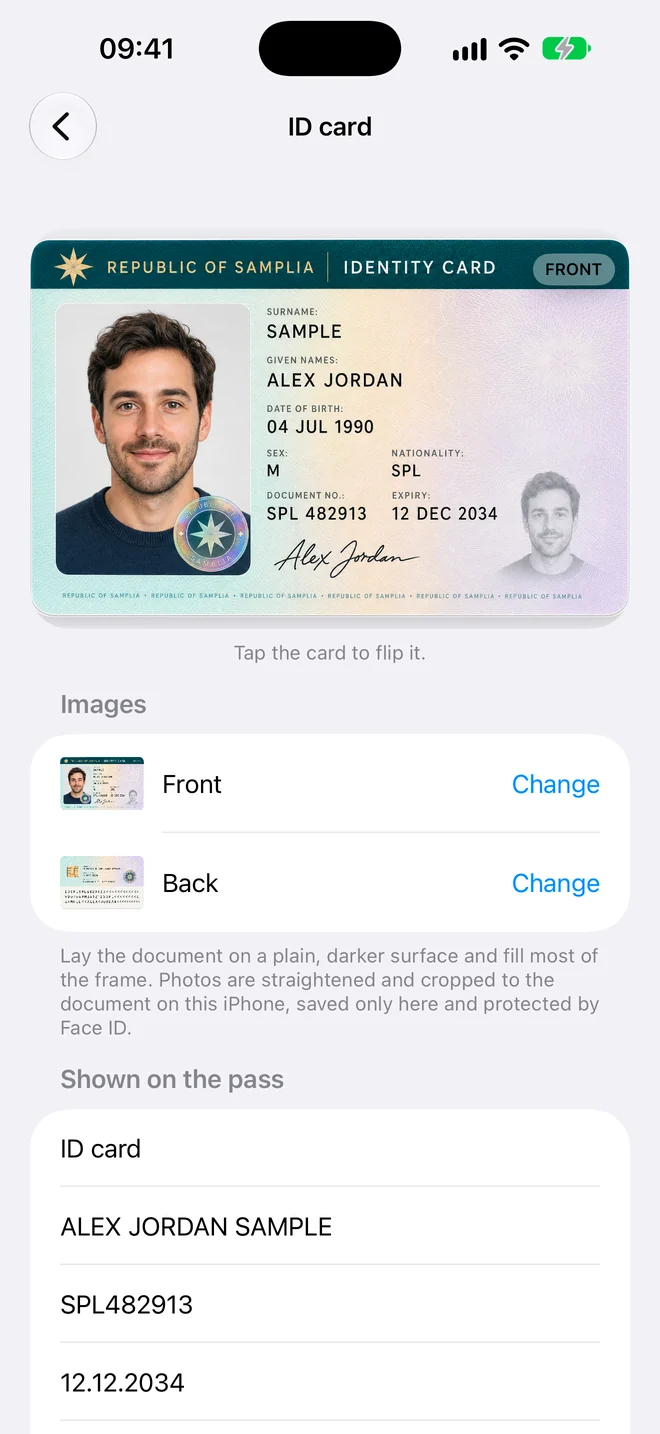
For any other ID, an app can add a Wallet pass that shows a copy of the card. ID to Wallet, our app, does this for ID cards, driving licences, passports and residence permits from any country. The copy is for convenience and isn't accepted as ID.
What Apple Wallet supports officially
Apple lists 17 places where you can add a driver's license or state ID: Arizona, Arkansas, California, Colorado, Georgia, Hawaii, Illinois, Iowa, Maryland, Montana, New Mexico, North Dakota, Ohio, Oklahoma, Virginia, West Virginia and Puerto Rico.
Since November 2025, people with a US passport can also create a Digital ID from it. It needs an iPhone 11 or later with iOS 26.1, works at select TSA checkpoints for domestic travel, and doesn't replace the passport for international travel.
Outside the US, Japan's My Number Card has been available in Apple Wallet since June 2025. Apple lists no official ID from the UK or the EU.
How to add an official ID in the Wallet app
If your state is on Apple's list, or you have a US passport, Apple's own steps are short. No other app is involved.
- Open the Wallet app and tap the Add button.
- Choose Driver's License or State ID (or Digital ID, for a US passport) and follow the prompts.
- Scan the front and back of your licence or ID, or the photo page of your passport. For a Digital ID, iPhone also reads the chip in the passport.
- Take a selfie and make the head movements iPhone asks for.
- Wait for approval. For a licence or state ID, the issuing state checks the request; Wallet tells you when the ID is ready.
Apple Support has the full requirements, including the iPhone and iOS versions needed. The links are under Sources.
Where an official Wallet ID is accepted
TSA accepts digital IDs from Apple Wallet at more than 250 airports, and some businesses and apps can check them with Verify with Wallet.
Apple and TSA both tell you to keep carrying your physical ID, because not every checkpoint, business or police officer accepts the digital one.
Why an app can't add an official ID
When you add a state ID, Apple sends your ID images and a selfie to the state that issued it, and the state decides whether to approve it.
Apps have no part in that process. A third-party app can only add an ordinary Wallet pass, the kind used for boarding passes and loyalty cards.
What a personal copy is for
A Wallet pass with a copy of your ID helps when you need the details rather than proof: typing your passport number into a booking, filling in a form, or checking an expiry date.
- It isn't issued by a government.
- It isn't accepted as ID at airports, by police or in shops.
- Keep carrying the original wherever ID is required.
How to add any other ID card with ID to Wallet
- Hold your iPhone over the document. The photo takes itself when it's steady and sharp.
- Check the name, number and dates. The app reads them from the machine-readable lines on passports and most ID cards, the barcode on US and Canadian licences, or the numbered fields on EU licences.
- Tap Add. The pass appears in Apple Wallet in the card's own colour.
The images stay on your iPhone. The pass's QR code opens a copy of both sides that is encrypted on your phone and unlocks only with your code.
Read the full scanning walkthrough, with tips for glare and cards the app can't read
Questions
Can I add my physical ID card to Apple Wallet?
Only as a copy, unless your ID comes from one of the 17 US states and territories Apple supports. For those, the Wallet app adds an official ID. For any other card, an app such as ID to Wallet adds a pass that shows a copy of it.
Is there an app that adds my ID to Apple Wallet?
Yes, as a personal copy. ID to Wallet is an iPhone app that scans an ID card, driving licence, passport or residence permit from any country and adds a Wallet pass that shows it. An official ID can only come from a government that works with Apple.
Can I put a photo of my ID in Apple Wallet?
Not with Apple Wallet alone, because Wallet only takes passes. An app has to turn the photo into a pass. ID to Wallet does this and reads the details from the card for you.
Can I use the pass at the airport?
No. TSA accepts official digital IDs from participating states and Apple's passport Digital ID, at select checkpoints. A personal copy isn't accepted, so bring your physical ID.
Which countries does ID to Wallet support?
Any country. It reads the machine-readable lines that passports and most ID cards carry, the barcode on US and Canadian licences, the numbered fields on EU licences, and printed labels in English and Spanish. For any other card you scan it and type the details yourself.
How much does ID to Wallet cost, and is there an Android version?
Adding your first document is free. More documents are a one-time US$4.99 (or the same in your currency), with no subscription, and the app needs no account. It runs on iPhone with iOS 17 or later. There's no Android version.
What happens to my ID data?
Images and details stay on your iPhone, in the app's protected storage behind Face ID. The server that signs the pass holds the image in memory only and never stores it. The copy behind the QR code is encrypted on your phone, and the key never reaches the server.
Sources
- Apple: IDs in Apple Wallet (supported states)
- Apple Support: Add your driver's license or state ID to Apple Wallet
- Apple Support: Create a Digital ID in Apple Wallet
- Apple Newsroom: Apple introduces Digital ID (November 2025)
- Apple Newsroom Japan: My Number Card on iPhone (June 2025)
- TSA: Digital ID
- Apple Platform Security: IDs in Wallet
Related
- ID to Wallet: the iPhone app that adds a copy of your ID to Apple Wallet
- How to scan an ID into Apple Wallet, step by step
- Apps that add an ID to Apple Wallet, compared
- How to add a Romanian ID card to Apple Wallet
- Driver's license in Apple Wallet when your state isn't supported
- Add a non-US passport to Apple Wallet
Add a copy of your ID to Apple Wallet
Scan it, check the details, add it to Wallet.